---
title: Manage Microsoft Teams from M-Files
date: 2024-05-07T13:42:24Z
modified: 2026-01-22T11:06:44Z
permalink: "https://ctrldocs.com/portfolio/ctrlteams/"
type: portfolio
status: publish
excerpt: CtrlTMS– Manage Microsoft Teams from M-Files – create Team/Channel and Folder structure, add Templates and start/stop synchronization to M-Files
wpid: 79216
portfolio-category:
- M-Files Application
portfolio-tags:
- Featured
featured_image: "https://ctrldocs.com/wp-content/uploads/2024/05/CtrlTms-442-x-343-2.webp"
---
Home
/*! elementor - v3.21.0 - 30-04-2024 */
.elementor-heading-title{padding:0;margin:0;line-height:1}.elementor-widget-heading .elementor-heading-title[class*=elementor-size-]>a{color:inherit;font-size:inherit;line-height:inherit}.elementor-widget-heading .elementor-heading-title.elementor-size-small{font-size:15px}.elementor-widget-heading .elementor-heading-title.elementor-size-medium{font-size:19px}.elementor-widget-heading .elementor-heading-title.elementor-size-large{font-size:29px}.elementor-widget-heading .elementor-heading-title.elementor-size-xl{font-size:39px}.elementor-widget-heading .elementor-heading-title.elementor-size-xxl{font-size:59px}# Manage Microsoft Teams from M-Files
M-Files is the market-leading Information Management Platform, managing documents and other information using metadata. It allows you to securely store and search through all your documents, regardless of where they are located.
However, many organizations rely on Microsoft solutions like Teams and SharePoint for collaboration and document creation. These tools provide a convenient way to collaborate on the projects within a familiar interface and standard **folder structure**.
[ Contact us
](https://ctrldocs.com/contact/?product_interest=CtrlSync)
/*! elementor - v3.21.0 - 30-04-2024 */
.elementor-widget-image{text-align:center}.elementor-widget-image a{display:inline-block}.elementor-widget-image a img[src$=".svg"]{width:48px}.elementor-widget-image img{vertical-align:middle;display:inline-block} 

### CtrlSync is a powerful tool that allows you to sync files between Microsoft Teams or SharePoint and M-Files.
With CtrlSync, you can have the best of both worlds:
- Collaborate and create documents within Microsoft Teams or SharePoint,
- Seamlessly create a backup and keep it updated inside your metadata-managed M-Files vault.
This gives you the ultimate flexibility to work where you want and how you want, while still being able to utilize the metadata structure for archiving your documents.
/*! elementor - v3.21.0 - 30-04-2024 */
.elementor-column .elementor-spacer-inner{height:var(--spacer-size)}.e-con{--container-widget-width:100%}.e-con-inner>.elementor-widget-spacer,.e-con>.elementor-widget-spacer{width:var(--container-widget-width,var(--spacer-size));--align-self:var(--container-widget-align-self,initial);--flex-shrink:0}.e-con-inner>.elementor-widget-spacer>.elementor-widget-container,.e-con>.elementor-widget-spacer>.elementor-widget-container{height:100%;width:100%}.e-con-inner>.elementor-widget-spacer>.elementor-widget-container>.elementor-spacer,.e-con>.elementor-widget-spacer>.elementor-widget-container>.elementor-spacer{height:100%}.e-con-inner>.elementor-widget-spacer>.elementor-widget-container>.elementor-spacer>.elementor-spacer-inner,.e-con>.elementor-widget-spacer>.elementor-widget-container>.elementor-spacer>.elementor-spacer-inner{height:var(--container-widget-height,var(--spacer-size))}.e-con-inner>.elementor-widget-spacer.elementor-widget-empty,.e-con>.elementor-widget-spacer.elementor-widget-empty{position:relative;min-height:22px;min-width:22px}.e-con-inner>.elementor-widget-spacer.elementor-widget-empty .elementor-widget-empty-icon,.e-con>.elementor-widget-spacer.elementor-widget-empty .elementor-widget-empty-icon{position:absolute;top:0;bottom:0;left:0;right:0;margin:auto;padding:0;width:22px;height:22px} 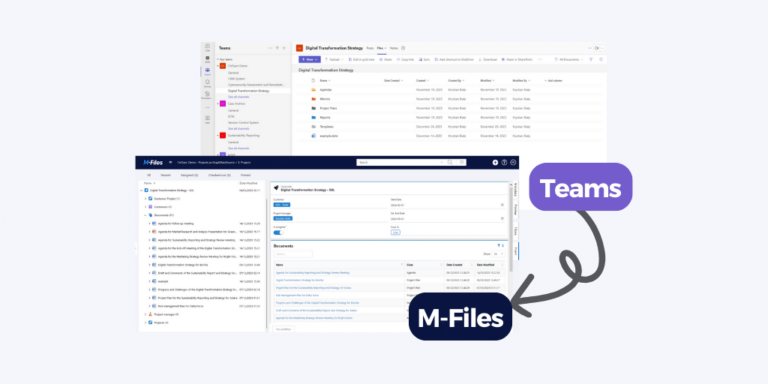
### Archiving made simple
- Work on a document without leaving Microsoft Teams
- Let CtrlSync **automatically backup your files** in M-Files.
- Synchronization works for Teams, Channels, SharePoint Sites or Sub-Sites.
### Unlock the power of searching
- Save your documents with **enriched metadata**
- Enable fast, **full-text search across multiple sites** to find what you need.
- Our solution empowers efficient information management, so you can focus on what matters most.
### Enhance security and compliance
- Leverage the powerful features of M-Files to **protect your files** from unauthorized access, loss, or corruption.
- CtrlSync allows you to apply permissions, workflows, and track the version history of your files.
- Documents are saved On-Premise, in your Cloud or M-Files Cloud of your choosing.
## Synchronization in 3 easy steps
/*! elementor - v3.21.0 - 30-04-2024 */
.elementor-toggle{text-align:start}.elementor-toggle .elementor-tab-title{font-weight:700;line-height:1;margin:0;padding:15px;border-bottom:1px solid #d5d8dc;cursor:pointer;outline:none}.elementor-toggle .elementor-tab-title .elementor-toggle-icon{display:inline-block;width:1em}.elementor-toggle .elementor-tab-title .elementor-toggle-icon svg{margin-inline-start:-5px;width:1em;height:1em}.elementor-toggle .elementor-tab-title .elementor-toggle-icon.elementor-toggle-icon-right{float:right;text-align:right}.elementor-toggle .elementor-tab-title .elementor-toggle-icon.elementor-toggle-icon-left{float:left;text-align:left}.elementor-toggle .elementor-tab-title .elementor-toggle-icon .elementor-toggle-icon-closed{display:block}.elementor-toggle .elementor-tab-title .elementor-toggle-icon .elementor-toggle-icon-opened{display:none}.elementor-toggle .elementor-tab-title.elementor-active{border-bottom:none}.elementor-toggle .elementor-tab-title.elementor-active .elementor-toggle-icon-closed{display:none}.elementor-toggle .elementor-tab-title.elementor-active .elementor-toggle-icon-opened{display:block}.elementor-toggle .elementor-tab-content{padding:15px;border-bottom:1px solid #d5d8dc;display:none}@media (max-width:767px){.elementor-toggle .elementor-tab-title{padding:12px}.elementor-toggle .elementor-tab-content{padding:12px 10px}}.e-con-inner>.elementor-widget-toggle,.e-con>.elementor-widget-toggle{width:var(--container-widget-width);--flex-grow:var(--container-widget-flex-grow)} 1. Create Team with Folder Structure
- Create the **Team** (or alternatively Channel, SPO Site or Sub-site).
- For simplicity, we recommend establishing a standard **folder structure** that you can add to your Team, Channel, SPO Site, or Sub-Site.
2. Copy URL from Team and Paste it to M-Files Project (or other object)
- Begin by creating your Team and copy the URL associated with it.
- Next, locate the Project you want to connect to your Team within M-Files.
3. Activate and start Synchronization
- Click the “Activate” button. This action triggers CtrlSync to start adding documents that meet the Configuration criteria to M-Files with all the important and defined metadata.
- Whenever changes are made to the documents within Teams or SharePoint, a new version is automatically saved to M-Files.
When the Team, Channel, SPO Site or Sub-Site is deleted, the **Synchronization is ended** and the documents are saved in M-Files for your convenience.
### Configure the way you want CtrlSync to add and maintain metadata
In Teams or SharePoint, documents are traditionally organized into **Folders**.
While this approach makes sense for individuals working on isolated **Projects**, it becomes less effective in a repository that houses documents from various projects and other data sources. This is where **[M-Files](https://solutionmanagement.eu/en/solutions/document-management/) metadata management** truly shines.
CtrlSync translates folder information and other data from Teams or SharePoint into valuable metadata within M-Files.
Although CtrlSync caters to all use cases within your Teams/SPO domain, for simplicity, let’s focus on **Project Documentation** as the primary use case.
[ Find out more
](https://ctrldocs.com/help/products/CtrlSync/examples/sample_vault.html#setting-up-a-team)
There are many configuration options you can use:
- 1. Define how a MS Team team or channel, SPO site or Subsite relates to a Project or other objects in M-Files.
- Use Regular expressions to eg. connect a ProjectID from a Channel name to a ProjectID in M-Files
- Use Aliases
- Define a one-to-one textual connection
- 2. Define which folders in Teams/SPO should translate to metadata eg. document classes in M-Files
- 3. Define how a document name in SPO/Teams convert to a Document Class or other metadata in M-Files.
- 4. Define how the Creator or Modifier in Teams/SPO should be reflected in metadata
- 5. Define how often synchronization should run
Once the configuration is made, it will govern the way selected Teams, Channels, SharePoint Sites or Subsites are synchronized, maintained and archived in M-Files with relevant metadata.
## Conclusions
Love the familiar interface of Microsoft Teams and SharePoint for collaboration? But also crave the robust information management capabilities of M-Files? You no longer have to choose! CtrlSync seamlessly bridges the gap, allowing you to work seamlessly within Teams and SharePoint while leveraging the power of M-Files. **Effortlessly sync files ensuring your crucial documents are backed up securely within M-Files’ metadata-driven structure.**
CtrlSync empowers you to collaborate effectively, enrich your documents with metadata, and find information effortlessly through full-text search. Take control of your document security with permission management, version history tracking, and robust protection against unauthorized access and loss. **Experience the best of both worlds with CtrlSync. Start your free trial today!**
[ Free Trial
](https://ctrldocs.com/request-a-trial/?product_interest=CtrlSync)
## Requirements
- M-Files Licenses,
- M-Files Online Installation,
- CtrlSync requires that you add it as a Microsoft Azure application on your company’s cloud.
SCHEDULE A DEMO
#### Ready to See and Test Our Solutions for Real?
The best way to really understand what a solution is about is to see it in action for yourself. We will do our best to understand your business needs, demonstrate relevant solutions and help set up a demo environment so that you can try for yourself.
[ Contact Us
](https://ctrldocs.com/contact/?product_interest=CtrlSync)