
Add controlled documents to Elements
Elements.cloud has a URL library for the documents behind a process step, and no document control of its own. CtrlDocs for Elements adds it. A procedure is written, reviewed and approved in M‑Files, and the approved PDF replaces the old link in Elements.
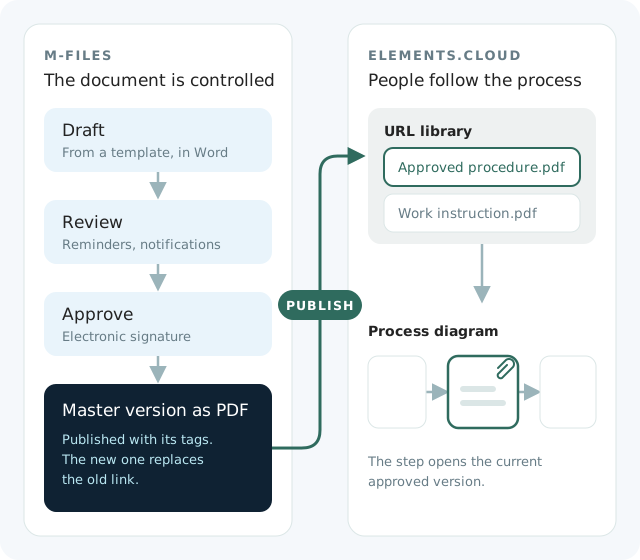
Everyone knows which version counts
Those who write and approve the documents do it in M‑Files. Those who follow the process stay in Elements.
Readers open the approved version
A reader opens the document from its activity in Elements, or finds it in the URL library, and there is only one version to find.
Editors see what is waiting for them
Each document is written in Word. Editors, reviewers and approvers each see the documents they are working on and the tasks waiting for them.
Process owners can show the history
Every past version is kept with a log of what changed, for the day someone asks.
Follow one procedure from draft to Elements
-
Started from the right template
Editor
The editor picks one of the controlled templates, so a new document begins in the proper one.
-
Reviewed, then approved
Reviewer and approver
The workflows hand out the tasks and send the reminders. Approval is signed electronically.
-
Published to Elements as a PDF
CtrlDocs for Elements
The approved version becomes a PDF in the Elements URL library, tagged and ready to attach to activities.
-
Replaced or retired
Process owner
A new publication replaces the old link. Retiring a document has its own workflow, and the document is retired everywhere it was published.
-
The link leads to the current version
Readers in Elements no longer have to check whether a newer version exists somewhere else. Retired documents stay in the archive, out of everyday view but still searchable.
Works with the storage and workflows you run
The files sit where your readers can reach them
The published files go to a storage location you choose, such as network folders, SharePoint or Dropbox.
Attachments updated from one place
CtrlDocs for Elements can attach the document links to the activities you select. That lets you update the attachments on many process diagrams at once, with automation if you want it.
Your own steps in the workflow
When the pre-configured workflows do not cover your procedure, you add steps and automation to them, or create a new workflow from scratch.
Audits and changes handled the same way
Add-on modules cover audits, changes and knowledge management, so changes to process diagrams, controlled documents and ISO requirements follow a workflow too. For a complete quality management system, Solution Management makes VisualQMS on M‑Files and Elements, using several of our apps.
What you need to start
- An Elements.cloud Pro Space. If you already have one, we can start planning the implementation.
- The base package, with a minimum of five document editor seats.
- Nothing else: the solution comes pre-configured, so you start from a working procedure, and the workflows are adjusted where your procedure is different.